
How to: Know IP address of any website


Here is way to know Internet Protocol (IP) Address of any website. Here are the steps to know-
  1. Go to Start> and Search for cmd or Command Prompt.
  2. Now write following code in Command Prompt  
  ping "ENTER ANY WEBSITE URL HERE" and press Enter


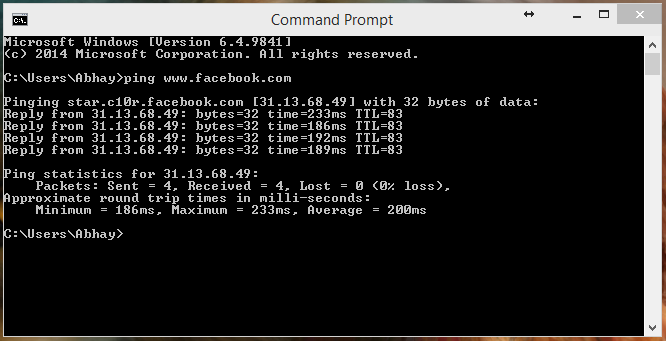
Your system will show that IP that you want to know. Now you can directly add this address to URL and will able to open website through this IP.

Here is example-


#KeepBrowsing @Favor8HubIndia

Comments

Popular posts from this blog

10 Best Free Android Apps August 2020 | Favor8hub

App developers are pushing the envelope on a daily basis trying to improve and enhance our smartphone experiences. In fact, so many Android apps come out every day that it’s difficult to keep track of them all. And that’s exactly why today We're going to show you 10 Best Free Android Apps for the month of August 2020 that you should definitely  try. Retro Music Player Online media streaming platforms are on the rage right now. Apps like Spotify, Gaana Music, and many other online media streaming platforms did gain a lot of popularity in recent times which made the users shift to the online music world completely. But still, there are a lot of people who prefer to download music and listen to offline. If you are one of them, the Retro Music Player is for you. The Retro music player is beautifully designed and organizes your music neatly laid out album wise. Unlike the other offline players, here you will have total control over the theming and customization. You can also choose betw...

How to change resolution of a PowerPoint slide

You can change the export resolution in Microsoft PowerPoint by saving a slide in a picture format. There are two steps to this process: using the system registry to change the default resolution setting for exported slides, and then actually saving the slide as a picture at the new resolution. Change the export resolution setting Important Follow the steps in this section carefully. Serious problems might occur if you modify the registry incorrectly. Before you modify it, back up the registry for restoration in case problems occur. By default, the export resolution of a PowerPoint slide that you want to save as a picture is 96 dots per inch (dpi). To change the export resolution, follow these steps: Step-1: Exit all Windows-based programs. Step 2: Click Start, and then click Run. Step 3: In the Open box, type regedit, and then click OK. Step 4: Locate one of the following registry subkeys, depending on the version of PowerPoint that you're using: PowerPoint 2016 HKEY_CURRE...
Turn off Windows Updates in Windows 10

There is no option to turn off Windows Updates using the Control Panel or Settings app in Windows 10, as it used to be with earlier versions of Windows. But there is a workaround to disable or turn off Windows Update in Windows 10, that we’ll talk about in this post. Turn off Windows Updates in Windows 10 You can do this using the Windows Update service. Via Control Panel > Administrative Tools , you can access Services . In the Services window, scroll down to Windows Update and turn off the process . To turn it off, right-click on the process, click on Properties and select Disabled . That will take care of Windows Updates not being installed on your machine.